AI chatbots for business answer every visitor in seconds, 24/7 and speed is everything, since replying within five minutes makes you ~100x more likely to connect (MIT). Done right they capture far more leads (one HubSpot bot drove 182% more qualified leads) and resolve most support issues.
Done wrong, they frustrate so the difference is all in the design and escalation.
Most website visitors leave without a word. They have a question, no one answers it instantly, and they’re gone.
AI chatbots for business close that gap. This guide covers how they capture and convert more leads, what the data says about their impact, and how to deploy them so they help customers instead of annoying them.
What are AI chatbots for business?
AI chatbots for business are conversational tools that use artificial intelligence to engage website and app visitors automatically answering questions, qualifying leads, booking meetings and resolving support issues around the clock. Unlike old scripted bots, modern ones understand natural language and handle real conversations.
The market reflects how mainstream they’ve become. Grand View Research valued the conversational AI market at $11.6 billion in 2024, projected to reach $41.4 billion by 2030.
Why speed-to-lead makes chatbots powerful
The single biggest reason to use a chatbot is timing. The window to convert a lead is measured in minutes.
The foundational research is stark. Contacting a web lead within five minutes makes you about 100x more likely to connect and 21x more likely to qualify it than waiting 30 minutes (MIT/InsideSales).
Yet most businesses are slow. A Harvard Business Review audit found the average first response took 42 hours, and 23% of companies never responded at all.
A chatbot closes that gap completely. It answers in seconds, every time, including nights and weekends hitting the five-minute window automatically.
How chatbots capture and convert leads
A good chatbot is a tireless front-line rep. It runs the same motion on every visitor.
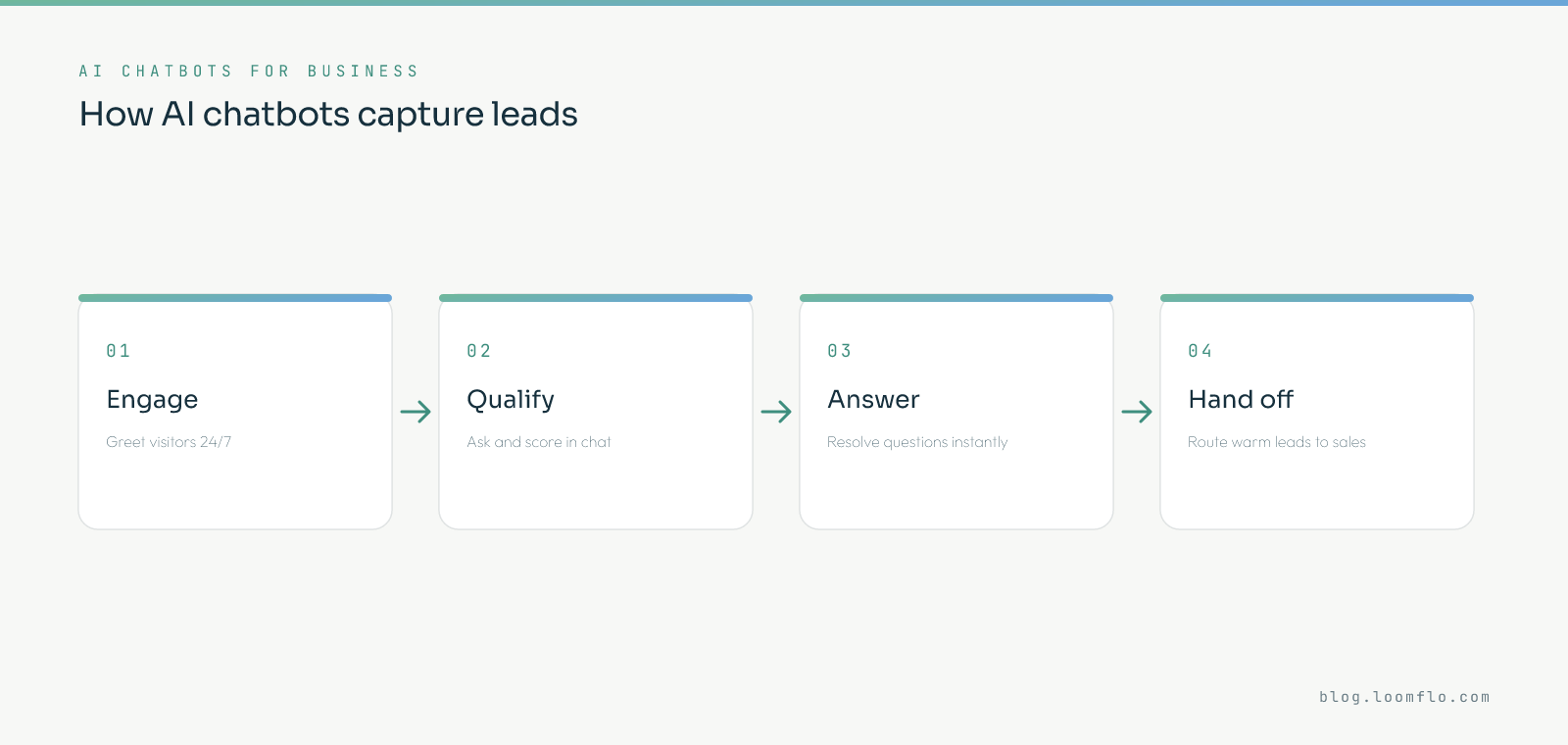
1. Engage
It greets every visitor instantly, 24/7, before they bounce. No one waits on hold or fills a form into the void.
2. Qualify
It asks the right questions and scores fit in the conversation. By the time a human gets involved, the lead is already qualified.
3. Answer
It resolves common questions on the spot, removing friction from the buying journey. Quick, accurate answers keep momentum going.
4. Hand off
It routes warm, qualified leads to sales or books a meeting directly. The human steps in exactly when they add the most value.
The results: do they actually work?
When designed well, the lead-capture lift is significant. The proof comes from real deployments.
In a HubSpot case study, a chatbot drove 182% more qualified leads, with 75% more people engaging than with live chat, and over half answering qualifying questions before reaching a human.
Support results are strong too. Salesforce found AI already handles about 30% of service cases, projected to reach 50% by 2027, freeing reps for complex work.
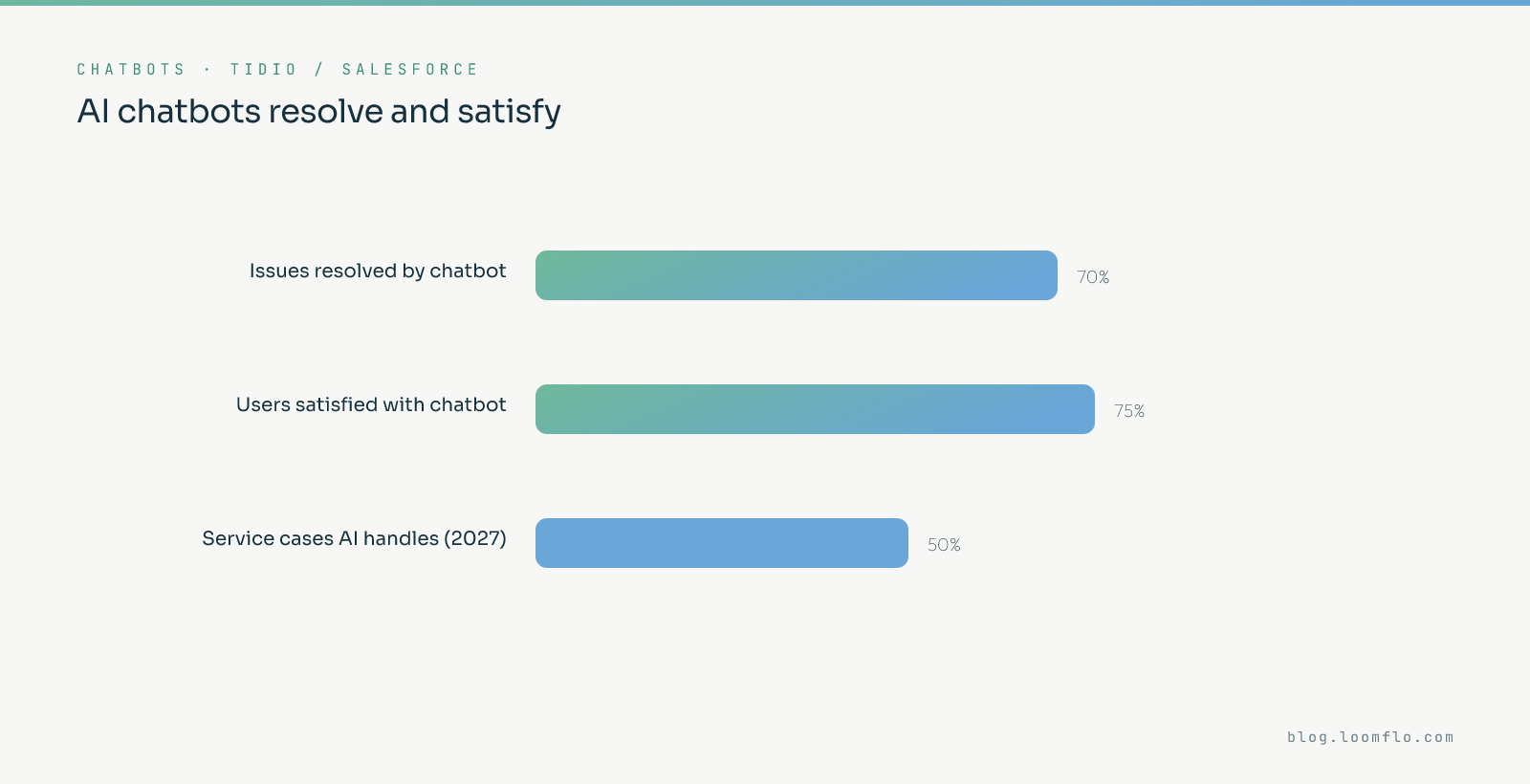
Satisfaction is higher than the skeptics expect. Tidio found about 75% of users were satisfied with their chatbot interaction, and over 70% had their issue fully resolved.
The catch: a bad bot is worse than no bot
This is the part most chatbot projects underestimate. A frustrating bot actively costs you customers.
The same Tidio study found the flip side. 70% of users have sworn at a chatbot out of frustration, and about 30% prefer waiting for a human even when a bot is offered.
The stakes are high. Zendesk found 63% of consumers will switch to a competitor after just one bad experience — so a confidently wrong bot answer can lose the sale outright.
Design for trust, not just speed
The fix isn’t to avoid chatbots it’s to design them to feel helpful and human. Tone matters as much as speed.
Zendesk found 64% of consumers are more likely to trust AI agents that show friendliness and empathy, and that companies with human-centred AI see materially higher acquisition and retention.
So a chatbot is part of your brand voice, not a deflection device. Treat it like a team member, not a wall.
How to deploy AI chatbots for business well
The difference between a lead engine and a frustration machine is a handful of design choices.
1. Always offer a fast human escalation
Never trap users in a bot loop give a clear, quick path to a person. Around 30% of users want a human even when a bot is available, so respect that.
2. Use the bot to qualify, then hand off
Let the chatbot capture and qualify, then route warm leads to humans. HubSpot’s hybrid model produced 182% more qualified leads precisely because it didn’t fully automate.
3. Design for empathy and brand voice
Make the bot friendly and on-brand, since trust rises 64% when AI feels human. Tone is part of the experience.
4. Prioritise accuracy over coverage
Scope the bot to what it can answer well, because one bad answer can lose a customer. A wrong, confident reply is worse than “let me get a human.”
5. Measure and tune continuously
Track resolution rate, lead capture, CSAT and escalation rate, and improve the knowledge base over time. Real deployments climb from ~50% to ~67% resolution through tuning (Intercom).
Where chatbots fit in your funnel
AI chatbots for business are the instant front door to your pipeline. They capture intent the moment it appears and feed qualified leads into the rest of your system.
That speed advantage is the same one behind autonomous outreach. For how agents work the whole funnel, see our guide on AI lead generation, and on the economics of automating sales, AI vs Human SDRs.
Used well, a chatbot makes sure no interested visitor ever slips away unanswered. That alone pays for itself.
AI chatbot use cases
Chatbots aren’t only for support. They add value anywhere a fast, automated conversation helps.
- Lead capture: Greeting and qualifying website visitors before they leave.
- Meeting booking: Routing qualified prospects straight to a calendar.
- Customer support: Resolving common questions instantly, 24/7.
- Onboarding: Guiding new customers through setup and first value.
- FAQ deflection: Answering routine queries so humans handle the complex ones.
- Product guidance: Helping shoppers find the right option and reducing friction.
The common thread is speed and availability. A chatbot does the instant, repetitive work so people do the high-value work.
Lead-capture bots vs support bots
It helps to separate the two main jobs, because they’re designed differently. Confusing them is a common mistake.
A lead-capture bot is proactive and sales-focused. It engages visitors, qualifies them, and routes warm leads to your team or a calendar.
A support bot is reactive and service-focused. It answers questions, resolves issues, and escalates the ones it can’t handle.
Many businesses want both, and that’s fine just design each for its job. A bot trying to do everything usually does nothing well.
Metrics to track for AI chatbots
Measure the outcomes you actually care about, not chat volume. The right metrics depend on the bot’s job.
- Qualified leads captured: the core measure for a lead-capture bot.
- Resolution / automation rate: what share of support issues the bot handles without a human.
- Escalation rate: how often it correctly hands off, a sign of healthy design.
- Customer satisfaction (CSAT): because a frustrated visitor is a lost one.
- Conversion rate: whether chat interactions turn into pipeline or sales.
Track those and tune continuously, since results improve with iteration. A chatbot is a system to refine, not a switch to flip.
Are AI chatbots worth it?
For most businesses with web traffic, yes with the design caveats above. The economics are compelling.
The cost savings are real. Juniper Research estimated chatbots would save businesses billions of dollars and over 2.5 billion service hours, and AI now handles a growing share of cases.
The lead upside is bigger still. Capturing visitors who would otherwise leave instantly, 24/7 turns traffic you already pay for into pipeline.
The condition is quality. A well-designed bot with clean escalation pays for itself, while a frustrating one costs you customers so the investment is in design as much as software.
The handoff is everything
If there’s one thing that makes or breaks a business chatbot, it’s the handoff to a human. Get it right and the bot feels helpful; get it wrong and it feels like a trap.
Around 30% of users want a human even when a bot is offered, so a clear, fast escalation path is non-negotiable. Never make someone fight the bot to reach a person.
The best model is a relay, not a wall. The bot handles the instant, repetitive work and passes warm, qualified conversations to people at exactly the right moment.
Frequently asked questions
What are AI chatbots for business?
They’re conversational AI tools that engage visitors automatically answering questions, qualifying leads, booking meetings and resolving support, around the clock. Modern ones understand natural language, unlike old scripted bots.
Do they actually increase leads?
Yes, when designed well one HubSpot deployment drove 182% more qualified leads than live chat. The key is instant 24/7 replies plus in-chat qualification, which captures intent before visitors leave.
Will a chatbot frustrate my customers?
Only if it’s poorly designed. 75% of users are satisfied with good bots, but 70% have been frustrated by bad ones so a fast human escalation path and accurate answers are essential.
Can chatbots handle customer support?
Increasingly, yes AI already handles about 30% of service cases, heading to 50% by 2027. Use them for common questions and escalate complex ones to humans.
Should a chatbot replace human agents?
No it should handle the routine and hand off the rest. The best results come from a hybrid model where the bot qualifies and humans close or resolve complex issues.
How do I measure a chatbot’s success?
Track resolution rate, qualified leads captured, customer satisfaction and escalation rate. Then tune the knowledge base continuously, since results improve with iteration.
How much do AI chatbots cost?
From free or low-cost tools for small sites to enterprise platforms. The return usually comes from leads captured and support hours saved, which often outweigh the cost quickly.
Can a chatbot integrate with my CRM?
Yes, most modern chatbots push captured leads and conversation data straight into your CRM, so sales can follow up with full context.
Do customers actually like chatbots?
When they work well, yes about 75% are satisfied with good bots. The dissatisfaction comes from bad ones with no escalation, which is a design problem, not a chatbot problem.
What’s the difference between an AI chatbot and a scripted bot?
A scripted bot follows fixed rules and breaks outside them; an AI chatbot understands natural language and handles real, varied conversations. That flexibility is what makes modern bots useful.
Will they replace customer service teams?
No they handle the routine and free agents for complex, high-value cases. AI is projected to handle about half of service cases by 2027, with humans owning the rest.
How do I stop my chatbot from frustrating users?
Scope it to what it answers well, design a friendly tone, and always offer a fast path to a human. Accuracy and easy escalation separate a good bot from a bad one.
What makes a chatbot “AI” versus a simple bot?
An AI chatbot uses natural-language understanding to interpret intent and respond flexibly, while a simple bot follows preset buttons and scripts. The AI version handles real, unscripted questions.
Where should I put a chatbot on my site?
On high-intent pages pricing, product, contact and key landing pages where visitors are most likely to have questions. That’s where instant answers convert best.
Never miss a lead again
Loomflo’s AI Lead Generation engages, qualifies and books your ideal customers 24/7 so every interested visitor gets an instant, on-brand response.